Receipt guidelines
The card networks regularly update their receipt requirements and we push these changes to our terminals through new software updates. It’s important that you follow the guidelines below so that you can automatically take part of these changes without having to issue a new release of your application every time. Receipt printing is verified in the certification so make sure you read the following guidelines.
What do I print on the receipt? link
The source of the receipt shall exclusively use the “receipt” object. This object is built directly on the terminals internal receipt engine and will be automatically updated with the terminal software version. Constructing a custom receipt by using the separate data elements in the transaction response is not allowed as this requires a lot of complicated logic and upkeep from you as an ECR supplier. These recommendations are meant to be as future-proof as possible.
When do I print a receipt? link
A transaction receipt should always be offered to the cardholder when a payment attempt is performed regardless if its approved or declined, if they do not wish to receive a receipt you can omit printing it.
A transaction receipt should be offered in one of three ways:
- Printed directly from the terminals printer (if supported by terminal model)
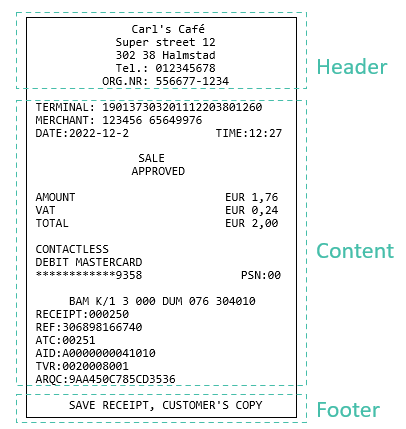
- Printed separately from an external printer (fig A)
- Printed embedded into the ECR receipt (fig B)
 |
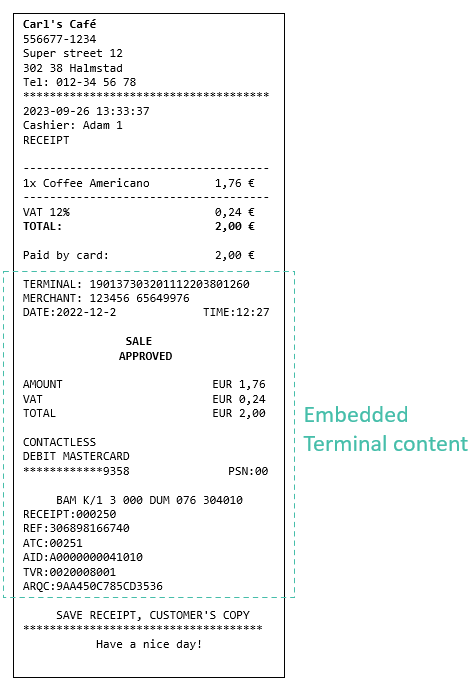 |
| Figure A | Figure B |
Which receipt do I print? link
Depending on the type of transaction either customer, merchants or both copies are expected to be printed. To remain compliant simply follow the “shouldPrint” constraint in the “receipt” object. If it returns true, print the associated the receipt.
    "customer": {
      "shouldPrint": true,
      "escpos": "string",
      "plain": "string",
      "embeddedPlain": {
        "header": "string",
        "content": "string",
        "footer": "string"
      }
    },
    "merchant": {
      "shouldPrint": false,
      "escpos": "string",
      "plain": "string",
      "embeddedPlain": {
        "header": "string",
        "content": "string",
        "footer": "string"
      }
    }
The receipt is available in three formats, you only need to use one:
Plain link
This is a plaintext receipt with tab characters (“\t”) and new lines (“\n”). If you are printing a separate terminal receipt you should be able to send this string directly to a printer to get a result very close to fig. A
ESC/POS link
If you are embedding the terminal receipt into your ECR receipt (fig. B) you can use this format to grab the content since your receipt probably already has a header/footer. Details on the format here and a step by step guide here
Word wrapping link
While the majority of the receipt can be printed as-is there are some long strings that do not have built-in linebreaks to accommodate different receipt widths, for example DCC disclaimer is one of them, see example text here, similar also happens on Refunds. It is recommended to enable some form of word wrapping to fit the entire text in a compliant manner. When inserting linebreaks they should be inserted on the blank space closest to the row character limit to avoid splitting a word in half. This applies to formats Plain and ESCPOS.
Embedded plain link
A new receipt type as of version 2.2 which brings some QoL thanks to integrator feedback!
- This receipt comes with sections so that you can avoid printing a header twice if you intend to embed the receipt into your ECR copy! If you are printing this receipt standalone or your receipt does not contain merchant information then you are still required to print the header section.
- Variable width, you can now set “receiptWidth” (between 30-128 characters, default value 34) in your requests and the terminal will shuffle the receipt spacing according to your specified width, this assumes you are using a monospaced font or your spacing will not be correct. This also takes care of word wrapping problems in long strings.
- This is the recommended default receipt type to use, it will most likely fit your use case!
Embedded plain examples link
          Test Merchant
          Streetname 2
          12345 Stockholm
         Tel.: 0840015400
        ORG.NR: 5566771234

TERMINAL:             238MKD8M9466
MERCHANT:     58142719 12341124231
DATE:2025-07-21         TIME:13:09

             PAYMENT
             APPROVED

AMOUNT                   SEK 10.00
EXTRA                     SEK 1.50
TOTAL                    SEK 11.50

VISA CONTACTLESS
VISA DEBIT
************0043           PSN: 01

   WLN K/1 3 000 WLN 065 981352
RECEIPT:000003    REF:308352120602

ATC:000D
AID:A0000000031010
TVR:0000000000
TSI:0000
ARQC:F418C6272F7A90CA

  SAVE RECEIPT, MERCHANT'S COPY
TERMINAL:                   238MKD8M9466
MERCHANT:           58142719 12341124231
DATE:2025-07-21               TIME:13:09

                PAYMENT
                APPROVED

AMOUNT                         SEK 10.00
EXTRA                           SEK 1.50
TOTAL                          SEK 11.50

VISA CONTACTLESS
VISA DEBIT
************0043                 PSN: 01

      WLN K/1 3 000 WLN 065 981352
RECEIPT:000003          REF:308352120602

ATC:000D
AID:A0000000031010
TVR:0000000000
TSI:0000
ARQC:F418C6272F7A90CA